
How to find the Hidden album on iPhone (and why it may be missing)
Published October 15, 2026
If the Hidden album is missing, the usual cause is a setting, not lost photos. Open Settings, go to Photos (on newer iOS versions, Apps, then Photos) and turn on Show Hidden Album. Then open the Photos app, find Utilities and tap Hidden.
This guide covers where the album sits, why it can vanish, how to unhide a photo and what to check if the photo is still not there. Menu names depend on your iOS version.
Where is the Hidden album on iPhone?
In the Photos app, the Hidden album lives in the Utilities section. Depending on your iOS version, open the Albums tab or the Collections tab and scroll down to Utilities. Tap Hidden, then tap View Album and unlock it with Face ID, Touch ID or your passcode.
Hidden photos are kept out of your main Library, Memories and widgets. They only show in this one album, which is why a hidden photo can look like it has been deleted.
Why is the Hidden album missing?
- Show Hidden Album is switched off. When it is off, the album is not listed under Utilities at all, but your hidden photos are still on the iPhone. Someone may have turned it off on purpose, or you may have done it yourself a while ago.
- You are looking in the wrong place. The album is under Utilities, not at the top of your albums. Scroll to the bottom.
- You are signed in to a different Apple Account, or iCloud Photos is off on this iPhone, so you are seeing a different library than the one where you hid the photo.
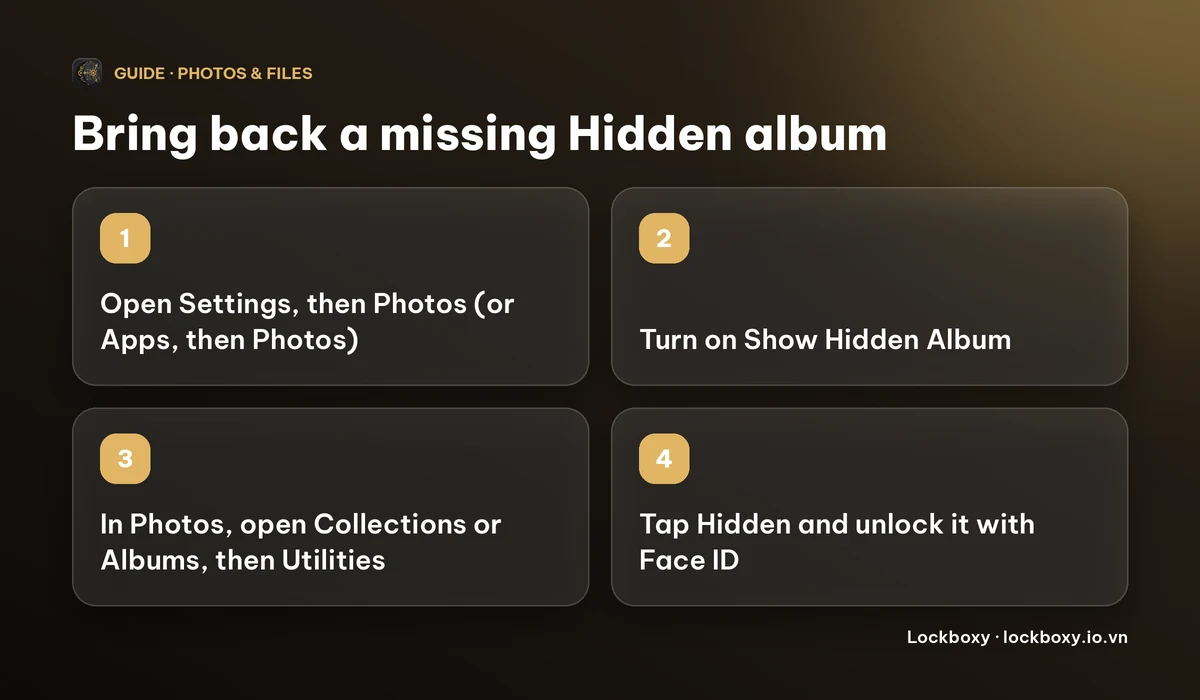
How do I show the Hidden album again?
- 1Open Settings and go to Photos. On newer iOS versions it is under Apps, then Photos.
- 2Turn on Show Hidden Album.
- 3Open the Photos app, go to Albums or Collections and scroll to Utilities.
- 4Tap Hidden and unlock it.
If you cannot find the switch, search for Photos in the Settings search field. The wording and position of the option differ a little between iOS versions.
How do I unhide a photo?
- 1Open the Hidden album and unlock it.
- 2Tap Select, then tap the photos you want back.
- 3Tap the More button (three dots) and choose Unhide. You can also touch and hold a single photo and choose Unhide.
The photo returns to your main Library, and it can show up again in Memories and widgets.
What if the photo is still not in the Hidden album?
- Check Recently Deleted. A photo you deleted, including one that was hidden, stays there for up to 30 days. Recently Deleted can ask for Face ID too.
- If you use iCloud Photos, give it time to finish syncing, and check that you are on Wi-Fi with enough iCloud storage.
- Make sure it was hidden on this account. If you hid the photo on a different iPhone, iPad or Mac signed in to the same Apple Account, it appears here once iCloud Photos has synced.
- Apple's own page for missing photos suggests checking the Hidden and Recently Deleted albums first, and restoring from a backup only if both are empty.
If a photo was permanently deleted more than 30 days ago and is in no backup, it cannot be brought back from inside Photos.
Is the Hidden album a good place for private photos?
It is a good tidy-up tool and, with Face ID turned on, it keeps casual snoopers out. It does not hide the photos from anyone who knows your iPhone passcode, because the passcode is always accepted as a fallback. Hidden photos also remain in the same library and sync through iCloud Photos if you use it. See how to hide photos on iPhone for the settings, and Lockboxy vs the Hidden album for an honest comparison.
If you want some photos to live outside the Photos library, with a passcode that is not your iPhone passcode, Lockboxy is a private, encrypted vault for iPhone built for that.
- 1Open Lockboxy with its passcode and go to the Media tab.
- 2Use the import button and pick photos in the iOS photo picker. Only the photos you pick are imported.
- 3Lockboxy can then offer to delete the originals from your library. iOS asks you to confirm, and deleted photos still sit in Recently Deleted for up to 30 days. See how to permanently delete photos on iPhone.
Photos in Lockboxy are encrypted with AES-256 on your device. There is no account and no server holding a copy.
What are the limits of this approach?
- Photos in Lockboxy do not sync to your iPad or Mac. Encrypted backup and Wi-Fi transfer between your own devices are Premium features.
- The vault key comes from your passcode. If you forget it, nobody, including us, can open the vault, unless you made a Recovery Key (Premium) beforehand.
- The free plan has room for up to 30 photos or videos and 10 files. The price of Premium is shown in the app before you buy; see the Premium page.
Frequently asked questions
Why did the Hidden album disappear from my iPhone?
Most often Show Hidden Album is switched off in Settings, under Photos (or Apps, then Photos). Turn it on, then look under Utilities in the Photos app. Your hidden photos were not deleted.
Where do hidden photos go on iPhone?
They move to the Hidden album, in the Utilities section of the Photos app. They are removed from your main Library, Memories and widgets.
How do I unhide photos on iPhone?
Open the Hidden album and unlock it, tap Select, choose the photos, tap More and then Unhide.
Can someone see my hidden photos without Face ID?
Anyone who knows your iPhone passcode can open the Hidden album, because the passcode works as a fallback for Face ID.
Are photos in Lockboxy shown in the Hidden album?
No. Photos stored in Lockboxy live in its own encrypted vault, not in your Photos library, so they never appear in the Hidden album or any other Photos album. Originals you leave in your library stay where they are.
Want a private place with its own passcode?
Lockboxy encrypts photos, videos, files and notes on your device, behind a passcode separate from your phone's. No account, no server.
Get Lockboxy on the App StoreMore guides
- How to hide photos on iPhone (and what “hidden” really protects)
- Lockboxy vs the iPhone Hidden album: which should you use?
- How to permanently delete photos on iPhone (and every copy you forgot)
- How to lock apps on iPhone: Face ID lock, hiding apps and older-iOS workarounds
- How to store photos of your ID safely on your phone
- How to lock notes on iPhone with a password or Face ID
- How to store passwords safely on your phone
- How to lend your iPhone without exposing your photos
- How to store a seed phrase safely (and what not to do)
- What to do before sending your iPhone for repair
- How to take photos that don't save to your iPhone camera roll
- How to scan documents on iPhone (no app needed) and store them safely
- How to store 2FA backup codes safely (and where not to)
- How to handle sensitive screenshots on iPhone (bank transfers, OTPs, IDs)
- How to keep voice recordings private on iPhone
- How to stop iPhone photos syncing to your iPad and Mac
- What to do when your iPhone is lost or stolen
- How to erase your iPhone before selling it
- Lockboxy vs locked notes on iPhone: which is better for private notes?
- Phone privacy for livestream sellers: keep customer data off the stream
- Keeping client documents private: a phone routine for real-estate agents
- How to hide contacts on iPhone: what really works
- How to tell if someone went through your iPhone
- How to move private photos to a new iPhone
- How to password protect a folder on iPhone
- How to remove location data from photos on iPhone before sharing
- How to store bank card details safely on your phone
- How to find and share a saved Wi-Fi password on iPhone
- How to stop unwanted photos from showing up in Memories and Featured Photos on iPhone
- How to control which photos an app can access on iPhone
Questions about how Lockboxy works? Read the FAQ